 シェアする
シェアする
Outputting with print() - Japanese Only
みなさまどうもおはこんばんにちわ。
さて、前回でXcodeとかを使ってSwiftの実行環境を整えましたので今回は早速ちょっとしたプログラミング(コーディング)をしてみましょう。
プログラミングを書くことを『コーディング』と言ったり言わなかったりします。
もちろん『コーディング』ではなく『プログラミング』という単語を使ってもOKですのでこの辺はお好みでどうぞ。
たまに現場とかで先輩に「プログラミングよろしく!」じゃなくて「コーディングよろしく!」と言われる事もありますので『コーディング』という単語は覚えておくと良いかもしれません。
さて、プログラミングを始める前にちょっと下準備がありますのでとりあえず開いたXcodeのエディタの左下の方を眺めてみましょう。以下の赤矢印のところですね。
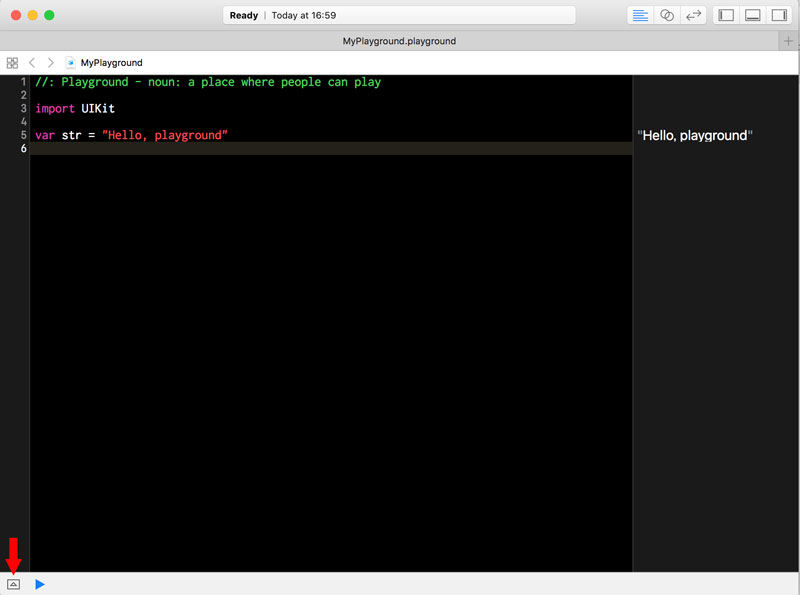
なにやら枠に囲われた三角形がありますね。この三角形が上に向いてたらポチッとこのマークをクリックしてみて下さい。するとこうなります。赤い矢印のところあたりに注目です。
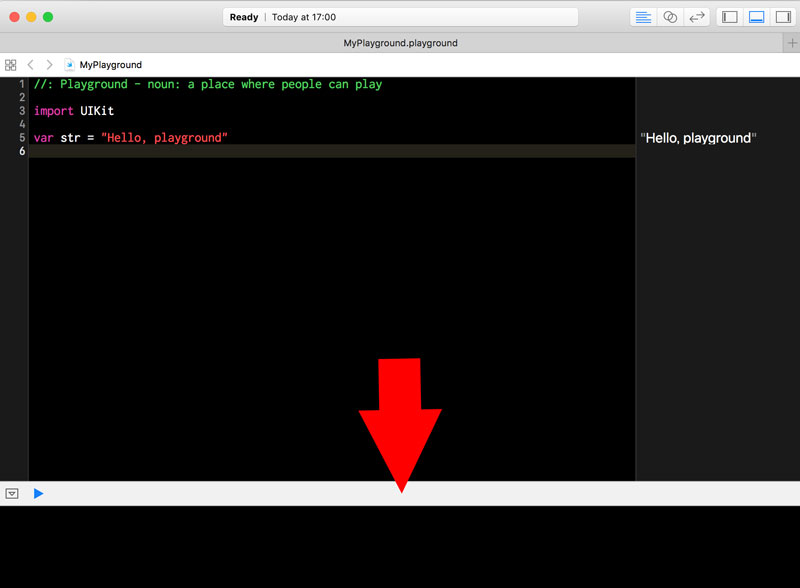
何やら下からにょっきりと変な領域が表れたと思います。これは『デバッグエリア』とか『デバッグ領域』とか呼ばれる部分でこれからめっちゃ使います。なのでとりあえず慣れないうちはこのデバッグエリアを常に表示するように心掛けて下さい。
そしたらエディタの方を確認してみましょう。多分以下のような文章が最初から記述されているかと思います。
//: Playground - noun: a place where people can play

import UIKit

var str = "Hello, playground"
(´-`).。oO(バージョンや環境によってちょっと違うかもしれません...)
さて、確認できましたらこの記述をドドンと全部消して下さい。何も気にせずバシッと消してしまってOKです。ほんとにスパッと消してしまっ(ry
そしたらこうなります。
はい、まあそのままなんですが何も記述されていない状態ですね。
続いて以下を記述してみましょう。コピペでも良いですが、練習になるかものなのでしっかりタイピングするのが良いかもです。
print("Hello world")
注意点として全て半角英数字で入力するようにして下さい。
基本的にプログラミングは全て半角英数字で行います。言語によっては日本語でも動いちゃったりするものもあるのですが、日本語のプログラミングはイロモノ扱いなのでご注意です。
記述が終わったらしばらく待ってみましょう。そしたら先程紹介したデバッグエリアを見てみて下さい。このような出力がされているはずです。
Hello world
ちゃんと動いたらおめでとうございます。Swiftの『Hello worldプログラム』の完成でございます。ちゃんと動かなかったら半角英数字でちゃんと入力できてるか確認してみましょう。多分、このくらいのプログラムならば半角英数字だけを気にするだけでOKかと思います。
『Hello worldプログラム』とは「Hello world」と出力するだけの世界一有名なプログラムです。
恐らくほぼ全てのプログラム言語の入門書の冒頭には「Hello world」とか「Hello Swift」とか「Hello, playground」とかを出力するだけの『Hello worldプログラム』に近いサンプルが掲載されているはずです。
「Hello world」と出力するだけなのになんで世界一有名なプログラムになったのか、って話なんですがC言語とUnixOSを開発したデニス・リッチー様(Dennis MacAlistair Ritchie)という超偉大な方がいらっしゃいます。
その方が執筆したC言語の解説書の冒頭に「hello, world」を出力するサンプルが掲載されており、その流れからか色々な言語の入門書の冒頭に載ってるサンプルが『Hello worldプログラム』っぽい感じにになっちゃってるって感じです。
ちなみにデニス・リッチー様は今現在主流になっているプログラム言語の基盤となっているC言語の開発者で、さらに今現在のパソコンに搭載されている全てのOSの基盤となったUnixOSの開発者でございます。
つまりデニス・リッチー様がいなければ今のパソコン(ネット)社会は存在しなかったのではないかという話になり、ここ数十年で一番世界を変える事が出来た人物なのではないかと個人的には考えています。
著者も「人生で一番世話になった人は誰か?」と聞かれれば即座に「デニス・リッチー様です!」って答えちゃうくらいのレベルでお世話になっております。はい。
(´-`).。oO(数年前、2011年の秋頃にお亡くなりになってしまったのですが...)
(´-`).。oO(日本ではあまりニュースにならず、ちょっと寂しかったですね...)
さて、では続いて先程記述した『print()』っていうやつについての解説です。こいつは『()』の中をデバッグエリアに出力してくれる関数になります。
先程は『()』の中に「Hello world」って記述しました。なのでデバッグエリアに「Hello world」って出力されている感じです。
では試しに『()』の中に『1』を記述してみましょう。こんな感じです。
print(1)
するとこうなります。
1
まあ想像通りの動きですね。「この『()』の中のものを出力してくれる」って動きだけバッチリ把握しておいて下さい。ここまでは大丈夫そうでしょうか。
続いての記事では『コメント』について確認していきましょう。ではではこの辺で。失礼いたします。
This article was written by Sakurama.

Author's beloved small mammal |
桜舞 春人 Sakurama HarutoA Tokyo-based programmer who has been creating various content since the ISDN era, with a bit of concern about his hair. A true long sleeper who generally feels unwell without at least 10 hours of sleep. His dream is to live a life where he can sleep as much as he wants. Loves games, sports, and music. Please share some hair with him. |
If you find any errors or copyright issues, please contact us.



