シェアする
シェアする
Overview of PHP Execution Environments - Images: Japanese
Hey there, everyone! Hope you're doing well.
Let's continue by getting your PHP programming environment set up. Before you write any code, you generally need to do what's called 'environment setup' — basically, getting everything in place so you can actually run your code and see it work.
First off, PHP files are plain text files, just like HTML. And PHP executes your source code directly as written — no need to use a compiler or do any compiling. Pretty convenient!
A compiler is a tool that translates written program code into machine language — the binary code (zeros and ones) that a processor can understand directly.
The process of converting code into machine language is called compiling.
Languages like 'C' require you to compile your code before you can run it (unless you use a full-featured 'SDK' — a development-focused editor environment). That can make things a bit tricky until you get used to it.
So having a decent text editor on hand will serve you well. It really comes down to personal preference — any editor with solid functionality will do. The author has been programming mostly with Sublime Text and Vim lately. Before that, Hidemaru Editor and Vim (vi) were the go-to tools. Feel free to take that as a reference if you like. This article also has an editor overview, so check it out when you have a moment — it might come in handy.
Alright, let's write a little PHP. PHP files use the '.php' extension — put your PHP code in a file ending in '.php', and the PHP processor will pick it up and run it.
By the way, you can actually change this extension in the server settings — for example, you could configure PHP to run inside .html files. But that makes it harder to tell whether a file is dynamicor something else entirely or static, so the common practice is to keep PHP execution limited to .php files.
So go ahead and create a text file called 'index.php' anywhere on your computer you like. You can name it anything really, but since we want this to be the top page, let's go with 'index.php'.
In web development, the convention is to name the file you want visitors to see first — the top page — something like index.html or index.php, following the index.xxx pattern.
This comes from the default web server configuration, which says: "When a request comes in without a filename, send back index.html." That convention carried over to other languages too, so naming your entry point index.xxx has become the standard across the board.
For example, when you visit http://wp-p.info/, you see the top page (index.php).
That's because the server is configured to say: "When someone accesses the site without a filename, send back 'index.php'." So hitting 'http://wp-p.info/' and 'http://wp-p.info/index.php' gives you the exact same result.
One thing to watch out for: make sure the text file's 'character encoding' is set to 'UTF-8'. This is because HTML5's recommended character encoding is UTF-8. It's not just PHP — these days, UTF-8 is the safe default for pretty much any programming work.
Note: For more on character encoding, see this article.
Back in the day it was all Shift_JIS, but you hardly hear about that anymore these days...
Now, open up that index.php you created and type in the following. It's the classic Hello world program. Copy-paste is fine too — if you're typing it by hand, just watch out for forgetting the semicolons.
<?php
echo 'Hello world';
The Hello world program is simply a program that outputs the text Hello world. Nothing more, nothing less.
The very first appearance of this example is credited to Dennis Ritchie — the developer of both Unix and the C programming language — in his book 'The C Programming Language'.
Ever since then, 'Hello world' has become the traditional first program in just about every programming textbook and tutorial.
Now save the file and open it in any browser you like. Here's what you'll see.
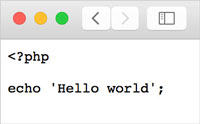
Yep — the code just shows up on screen as-is. That's because, as you can see, a regular browser has no PHP processing capability whatsoever.
This is true for any language, really — even if you write perfect code, without something that says "read this code and actually execute it," it's just a bunch of characters. No matter how elegant or efficient your program is, without a runtime to process it, it's just meaningless text. Kind of makes you feel a little something, doesn't it?
So first things first — let's set up a 'runtime environment' that can actually process PHP. PHP is a language designed specifically for embedding in web pages, so it's most often run 'remotely' — but for development, working 'locally' is the standard approach.
A 'remote server' is a computer set up to handle requests from the outside world — commonly just called a 'server' or 'remote'.
Your own computer, on the other hand, is called a 'local machine' — or just 'local' for short.
How to set up a PHP runtime environment on a remote server is something we'd like to cover in the 'Linux (Unix) Beginner' course someday.
Apologies — that content is still in progress!
Here's why you want to develop locally first: imagine you accidentally write an infinite loop in PHP and run it. Depending on the situation, it could potentially take down the entire server. If that's a shared hosting server, the other site owners on that server are going to be pretty unhappy with you.
On your own local machine, though, if you crash it with an infinite loop, the only person affected is you. So start local — it's just safer all around.
On modern operating systems, an infinite loop is unlikely to actually crash your entire computer.
Even if a process puts heavy load on your system, the core OS is generally designed to stay stable.
That said, older operating systems don't always have these safeguards built in, so if you ever find yourself playing around with a vintage OS for nostalgia's sake, just be a little careful.
Back in the day, setting up a local runtime for a dynamic language meant installing 'Apache' (the web server), then compiling and installing the language's processing packages, and so on — it was a real pain. These days, though, there are plenty of handy applications that can get your development environment up and running in no time.
'Apache' is the world's most widely used 'web server software'.
A web server listens on port 80 and, when a request comes in from the outside, sends back HTML files, CSS files, images, and other data. Your browser receives that data and displays it — and the software making all that happen is the 'web server software': Apache.
Since PHP is most often used for building dynamic websites, setting up a PHP environment typically means bundling Apache in as well.
Among the available options, we're going to use 'MAMP' (pronounced "mamp") to set up our PHP environment. 'XAMPP' (pronounced "zampp") is another popular one — it also bundles up everything you need to run PHP. XAMPP gives you a bit more fine-grained control, but MAMP (the free version) makes things simpler to set up at the cost of fewer configuration options, which makes it a great choice for beginners.
This is getting pretty long, so let's wrap it up here. In the next article, we'll go through installing MAMP.
Until then — see you next time!
This article was written by Sakurama.

Author's beloved small mammal |
桜舞 春人 Sakurama HarutoA Tokyo-based programmer who has been creating various content since the ISDN era, with a bit of concern about his hair. A true long sleeper who generally feels unwell without at least 10 hours of sleep. His dream is to live a life where he can sleep as much as he wants. Loves games, sports, and music. Please share some hair with him. |
If you find any errors or copyright issues, please contact us.