transform
The 'transform' property allows you to apply transformations such as 'translate', 'scale', 'rotate', and 'skew' to elements.
Depending on the browser version, the property may not work without vendor prefixes such as 'webkit', 'moz', or 'ms'. It is recommended to always include vendor prefixes when using this property.
Available Values
| Value | Effect |
|---|---|
| rotate(value) | Rotates the element by the specified angle. The only supported unit is 'deg'. |
| scale(value) | Scales the element up or down. Specify the scale factor as a number where '1.0' represents the element's original size. Note that units cannot be used — specify a plain number only. |
| skew(value) | Skews the element by the specified angle. The only supported unit is 'deg'. |
| translate(value) | Moves the element by the specified distance. The only supported unit is 'px'. |
Sample Code
transform: rotate(10deg);
-webkit-transform: rotate(10deg);
-moz-transform: rotate(10deg);
-ms-transform: rotate(10deg);
Browser Display Result
img {
    transform: rotate(10deg);
    -webkit-transform: rotate(10deg);
    -moz-transform: rotate(10deg);
    -ms-transform: rotate(10deg);
}
About the 'X-axis', 'Y-axis', and 'Z-axis'
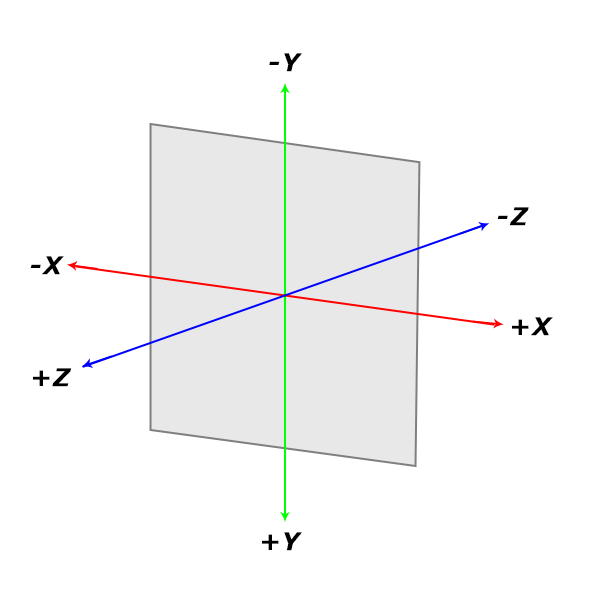
The 'X-axis', 'Y-axis', and 'Z-axis' are as shown in the image above. They are used as the axes for 'scale', 'skew', 'rotate', and 'translate' transformations.
The origin of the transformation is the center of the element. To change the origin, use 'transform-origin'.
Available Values (Rotation)
Value Effect rotate(angle) Rotates the element by the specified angle. The direction of rotation is clockwise. The only supported unit is 'deg'. Negative values are also allowed. rotateX(angle) Rotates the element around the X-axis by the specified angle. The direction of rotation is clockwise. The only supported unit is 'deg'. Negative values are also allowed. rotateY(angle) Rotates the element around the Y-axis by the specified angle. The direction of rotation is clockwise. The only supported unit is 'deg'. Negative values are also allowed. rotateZ(angle) Rotates the element around the Z-axis by the specified angle. The direction of rotation is clockwise. The only supported unit is 'deg'. Negative values are also allowed.
Browser Display Result
img {
    transform: rotate(10deg);
    -webkit-transform: rotate(10deg);
    -moz-transform: rotate(10deg);
    -ms-transform: rotate(10deg);
}
img {
    transform: rotateX(45deg);
    -webkit-transform: rotateX(45deg);
    -moz-transform: rotateX(45deg);
    -ms-transform: rotateX(45deg);
}
img {
    transform: rotateY(180deg);
    -webkit-transform: rotateY(180deg);
    -moz-transform: rotateY(180deg);
    -ms-transform: rotateY(180deg);
}
img {
    transform: rotateZ(10deg);
    -webkit-transform: rotateZ(10deg);
    -moz-transform: rotateZ(10deg);
    -ms-transform: rotateZ(10deg);
}
Available Values (Scale)
Value Effect scale(number, number) Specifies 'scaleX' and 'scaleY' together. The second number can be omitted; if omitted, the first value is used for both. Specify the scale factor as a number where '1.0' represents the element's original size. Note that units cannot be used — specify a plain number only. scaleX(number) Scales the element in the 'X direction'. Specify the scale factor as a number where '1.0' represents the element's original size. Note that units cannot be used — specify a plain number only. scaleY(number) Scales the element in the 'Y direction'. Specify the scale factor as a number where '1.0' represents the element's original size. Note that units cannot be used — specify a plain number only. scaleZ(number) Scales the element in the 'Z direction'. Specify the scale factor as a number where '1.0' represents the element's original size. Note that units cannot be used — specify a plain number only. scale3d(numberX, numberY, numberZ) Specifies 'scaleX', 'scaleY', and 'scaleZ' together. Specify the scale factor as a number where '1.0' represents the element's original size. Note that units cannot be used — specify a plain number only.
img {
    transform: scale(1.2, 0.8);
    -webkit-transform: scale(1.2, 0.8);
    -moz-transform: scale(1.2, 0.8);
    -ms-transform: scale(1.2, 0.8);
}
img {
    transform: scaleX(0.8);
    -webkit-transform: scaleX(0.8);
    -moz-transform: scaleX(0.8);
    -ms-transform: scaleX(0.8);
}
img {
    transform: scaleY(0.8);
    -webkit-transform: scaleY(0.8);
    -moz-transform: scaleY(0.8);
    -ms-transform: scaleY(0.8);
}
img {
    transform: scaleZ(0.8);
    -webkit-transform: scaleZ(0.8);
    -moz-transform: scaleZ(0.8);
    -ms-transform: scaleZ(0.8);
}
img {
    transform: scale3d(0.8, 1.2, 1.2);
    -webkit-transform: scale3d(0.8, 1.2, 1.2);
    -moz-transform: scale3d(0.8, 1.2, 1.2);
    -ms-transform: scale3d(0.8, 1.2, 1.2);
}
Available Values (Skew)
Value Effect skew(angle, angle) Specifies 'skewX' and 'skewY' together. The second angle can be omitted; if omitted, it is treated as '0'. The direction is clockwise and the only supported unit is 'deg'. Negative values are also allowed. skewX(angle) Skews the element along the X-axis by the specified angle. The direction is clockwise and the only supported unit is 'deg'. Negative values are also allowed. skewY(angle) Skews the element along the Y-axis by the specified angle. The direction is clockwise and the only supported unit is 'deg'. Negative values are also allowed.
img {
    transform: skew(5deg, 10deg);
    -webkit-transform: skew(5deg, 10deg);
    -moz-transform: skew(5deg, 10deg);
    -ms-transform: skew(5deg, 10deg);
}
img {
    transform: skewX(10deg);
    -webkit-transform: skewX(10deg);
    -moz-transform: skewX(10deg);
    -ms-transform: skewX(10deg);
}
img {
    transform: skewY(10deg);
    -webkit-transform: skewY(10deg);
    -moz-transform: skewY(10deg);
    -ms-transform: skewY(10deg);
}
Available Values (Translate)
Value Effect translate(numberX, numberY) Specifies 'translateX' and 'translateY' together. The second number can be omitted; if omitted, it is treated as '0'. The only supported unit is 'px'. Negative values are also allowed. translateX(number) Moves the element in the 'X direction' by the specified distance. The only supported unit is 'px'. Negative values are also allowed. translateY(number) Moves the element in the 'Y direction' by the specified distance. The only supported unit is 'px'. Negative values are also allowed. translateZ(number) Moves the element in the 'Z direction' by the specified distance. The only supported unit is 'px'. Negative values are also allowed. translate3d(numberX, numberY, numberZ) Specifies 'translateX', 'translateY', and 'translateZ' together. The only supported unit is 'px'. Negative values are also allowed.
img {
    transform: translate(10px, 20px);
    -webkit-transform: translate(10px, 20px);
    -moz-transform: translate(10px, 20px);
    -ms-transform: translate(10px, 20px);
}
img {
    transform: translateX(30px);
    -webkit-transform: translateX(30px);
    -moz-transform: translateX(30px);
    -ms-transform: translateX(30px);
}
img {
    transform: translateY(20px);
    -webkit-transform: translateY(20px);
    -moz-transform: translateY(20px);
    -ms-transform: translateY(20px);
}
img {
    transform: translateZ(20px);
    -webkit-transform: translateZ(20px);
    -moz-transform: translateZ(20px);
    -ms-transform: translateZ(20px);
}
img {
    transform: translate3d(10px, 20px, 20px);
    -webkit-transform: translate3d(10px, 20px, 20px);
    -moz-transform: translate3d(10px, 20px, 20px);
    -ms-transform: translate3d(10px, 20px, 20px);
}
| Value | Effect |
|---|---|
| rotate(angle) | Rotates the element by the specified angle. The direction of rotation is clockwise. The only supported unit is 'deg'. Negative values are also allowed. |
| rotateX(angle) | Rotates the element around the X-axis by the specified angle. The direction of rotation is clockwise. The only supported unit is 'deg'. Negative values are also allowed. |
| rotateY(angle) | Rotates the element around the Y-axis by the specified angle. The direction of rotation is clockwise. The only supported unit is 'deg'. Negative values are also allowed. |
| rotateZ(angle) | Rotates the element around the Z-axis by the specified angle. The direction of rotation is clockwise. The only supported unit is 'deg'. Negative values are also allowed. |
img {
transform: rotate(10deg);
-webkit-transform: rotate(10deg);
-moz-transform: rotate(10deg);
-ms-transform: rotate(10deg);
}
img {
transform: rotateX(45deg);
-webkit-transform: rotateX(45deg);
-moz-transform: rotateX(45deg);
-ms-transform: rotateX(45deg);
}
img {
transform: rotateY(180deg);
-webkit-transform: rotateY(180deg);
-moz-transform: rotateY(180deg);
-ms-transform: rotateY(180deg);
}
img {
transform: rotateZ(10deg);
-webkit-transform: rotateZ(10deg);
-moz-transform: rotateZ(10deg);
-ms-transform: rotateZ(10deg);
}
Available Values (Scale)
Value Effect scale(number, number) Specifies 'scaleX' and 'scaleY' together. The second number can be omitted; if omitted, the first value is used for both. Specify the scale factor as a number where '1.0' represents the element's original size. Note that units cannot be used — specify a plain number only. scaleX(number) Scales the element in the 'X direction'. Specify the scale factor as a number where '1.0' represents the element's original size. Note that units cannot be used — specify a plain number only. scaleY(number) Scales the element in the 'Y direction'. Specify the scale factor as a number where '1.0' represents the element's original size. Note that units cannot be used — specify a plain number only. scaleZ(number) Scales the element in the 'Z direction'. Specify the scale factor as a number where '1.0' represents the element's original size. Note that units cannot be used — specify a plain number only. scale3d(numberX, numberY, numberZ) Specifies 'scaleX', 'scaleY', and 'scaleZ' together. Specify the scale factor as a number where '1.0' represents the element's original size. Note that units cannot be used — specify a plain number only.
img {
transform: scale(1.2, 0.8);
-webkit-transform: scale(1.2, 0.8);
-moz-transform: scale(1.2, 0.8);
-ms-transform: scale(1.2, 0.8);
}
| Value | Effect |
|---|---|
| scale(number, number) | Specifies 'scaleX' and 'scaleY' together. The second number can be omitted; if omitted, the first value is used for both. Specify the scale factor as a number where '1.0' represents the element's original size. Note that units cannot be used — specify a plain number only. |
| scaleX(number) | Scales the element in the 'X direction'. Specify the scale factor as a number where '1.0' represents the element's original size. Note that units cannot be used — specify a plain number only. |
| scaleY(number) | Scales the element in the 'Y direction'. Specify the scale factor as a number where '1.0' represents the element's original size. Note that units cannot be used — specify a plain number only. |
| scaleZ(number) | Scales the element in the 'Z direction'. Specify the scale factor as a number where '1.0' represents the element's original size. Note that units cannot be used — specify a plain number only. |
| scale3d(numberX, numberY, numberZ) | Specifies 'scaleX', 'scaleY', and 'scaleZ' together. Specify the scale factor as a number where '1.0' represents the element's original size. Note that units cannot be used — specify a plain number only. |
img {
transform: scaleX(0.8);
-webkit-transform: scaleX(0.8);
-moz-transform: scaleX(0.8);
-ms-transform: scaleX(0.8);
}
img {
transform: scaleY(0.8);
-webkit-transform: scaleY(0.8);
-moz-transform: scaleY(0.8);
-ms-transform: scaleY(0.8);
}
img {
transform: scaleZ(0.8);
-webkit-transform: scaleZ(0.8);
-moz-transform: scaleZ(0.8);
-ms-transform: scaleZ(0.8);
}
img {
transform: scale3d(0.8, 1.2, 1.2);
-webkit-transform: scale3d(0.8, 1.2, 1.2);
-moz-transform: scale3d(0.8, 1.2, 1.2);
-ms-transform: scale3d(0.8, 1.2, 1.2);
}
Available Values (Skew)
Value Effect skew(angle, angle) Specifies 'skewX' and 'skewY' together. The second angle can be omitted; if omitted, it is treated as '0'. The direction is clockwise and the only supported unit is 'deg'. Negative values are also allowed. skewX(angle) Skews the element along the X-axis by the specified angle. The direction is clockwise and the only supported unit is 'deg'. Negative values are also allowed. skewY(angle) Skews the element along the Y-axis by the specified angle. The direction is clockwise and the only supported unit is 'deg'. Negative values are also allowed.
img {
transform: skew(5deg, 10deg);
-webkit-transform: skew(5deg, 10deg);
-moz-transform: skew(5deg, 10deg);
-ms-transform: skew(5deg, 10deg);
}
| Value | Effect |
|---|---|
| skew(angle, angle) | Specifies 'skewX' and 'skewY' together. The second angle can be omitted; if omitted, it is treated as '0'. The direction is clockwise and the only supported unit is 'deg'. Negative values are also allowed. |
| skewX(angle) | Skews the element along the X-axis by the specified angle. The direction is clockwise and the only supported unit is 'deg'. Negative values are also allowed. |
| skewY(angle) | Skews the element along the Y-axis by the specified angle. The direction is clockwise and the only supported unit is 'deg'. Negative values are also allowed. |
img {
transform: skewX(10deg);
-webkit-transform: skewX(10deg);
-moz-transform: skewX(10deg);
-ms-transform: skewX(10deg);
}
img {
transform: skewY(10deg);
-webkit-transform: skewY(10deg);
-moz-transform: skewY(10deg);
-ms-transform: skewY(10deg);
}
Available Values (Translate)
Value Effect translate(numberX, numberY) Specifies 'translateX' and 'translateY' together. The second number can be omitted; if omitted, it is treated as '0'. The only supported unit is 'px'. Negative values are also allowed. translateX(number) Moves the element in the 'X direction' by the specified distance. The only supported unit is 'px'. Negative values are also allowed. translateY(number) Moves the element in the 'Y direction' by the specified distance. The only supported unit is 'px'. Negative values are also allowed. translateZ(number) Moves the element in the 'Z direction' by the specified distance. The only supported unit is 'px'. Negative values are also allowed. translate3d(numberX, numberY, numberZ) Specifies 'translateX', 'translateY', and 'translateZ' together. The only supported unit is 'px'. Negative values are also allowed.
img {
transform: translate(10px, 20px);
-webkit-transform: translate(10px, 20px);
-moz-transform: translate(10px, 20px);
-ms-transform: translate(10px, 20px);
}
| Value | Effect |
|---|---|
| translate(numberX, numberY) | Specifies 'translateX' and 'translateY' together. The second number can be omitted; if omitted, it is treated as '0'. The only supported unit is 'px'. Negative values are also allowed. |
| translateX(number) | Moves the element in the 'X direction' by the specified distance. The only supported unit is 'px'. Negative values are also allowed. |
| translateY(number) | Moves the element in the 'Y direction' by the specified distance. The only supported unit is 'px'. Negative values are also allowed. |
| translateZ(number) | Moves the element in the 'Z direction' by the specified distance. The only supported unit is 'px'. Negative values are also allowed. |
| translate3d(numberX, numberY, numberZ) | Specifies 'translateX', 'translateY', and 'translateZ' together. The only supported unit is 'px'. Negative values are also allowed. |
img {
transform: translateX(30px);
-webkit-transform: translateX(30px);
-moz-transform: translateX(30px);
-ms-transform: translateX(30px);
}
img {
transform: translateY(20px);
-webkit-transform: translateY(20px);
-moz-transform: translateY(20px);
-ms-transform: translateY(20px);
}
img {
transform: translateZ(20px);
-webkit-transform: translateZ(20px);
-moz-transform: translateZ(20px);
-ms-transform: translateZ(20px);
}
img {
transform: translate3d(10px, 20px, 20px);
-webkit-transform: translate3d(10px, 20px, 20px);
-moz-transform: translate3d(10px, 20px, 20px);
-ms-transform: translate3d(10px, 20px, 20px);
}
Browser Compatibility
Desktop
 Chrome36+ ○
 35 △34 △33 △32 △31 △30 △29 △28 △
↑ Requires prefix '-webkit-'
 Firefox16+ ○
 15 △14 △13 △12 △11 △10 △9 △8 △
↑ Requires prefix '-moz-'
2 and earlier × Safari9+ ○8 △
 7 △6 △5 △4 △
↑ Requires prefix '-webkit-'
2 and earlier × Edge12+ ○
Supported in all versions
 IE11 ○10 ○9 △
Requires prefix '-ms-'
 8 ×7 ×
 6 ×
6 × Opera23+ ○22 △21 △20 △19 △18 △17 △16 △15 △
↑ Requires prefix '-webkit-'
22 △21 △20 △19 △18 △17 △16 △15 △↑ Requires prefix '-o-'
 9 and earlier ×
Mobile
 iOS Safari9+ ○8 △7 △6 △5 △4 △
↑ Requires prefix '-webkit-'
2 and earlier × Android Browser4.4+ ○2 △
↑ Requires prefix '-webkit-'
Chrome AndroidLatest ○Same support as desktop
Firefox AndroidLatest ○Same support as desktop


 シェアする
シェアする