padding-left
Specifies the left padding (inner spacing) of an element.
Sample Code
style.css
/* px value */
p.test { padding-left: 10px;}

/* %: calculated based on the parent element's width */
p.test2 { padding-left: 10%;}

/* 0: no left padding */
p.test3 { padding-left: 0;}

/* Reset ul list indentation */
ul { padding-left: 0; list-style: none;}

/* Distinguish blockquote with left padding */
blockquote { padding-left: 20px; border-left: 4px solid #ccc;}
Available Values
| Value | Description |
|---|---|
| number | A numeric value. Commonly used units are 'px' and '%'. Negative values are not allowed. When specified as '%', the reference size is the width of the containing block. The initial value is '0'. |
Browser Display Result
<div style="padding-left: 50px; border: solid 1px #f00;">
	<div style="background-color: #ff0;">This is a div element inside a div element. The parent div element has 'padding-left: 50px' specified.</div>
</div>
Details
Specifies the left padding (inner spacing) of an element.
Padding is the space inside the border. See the box model diagram below.
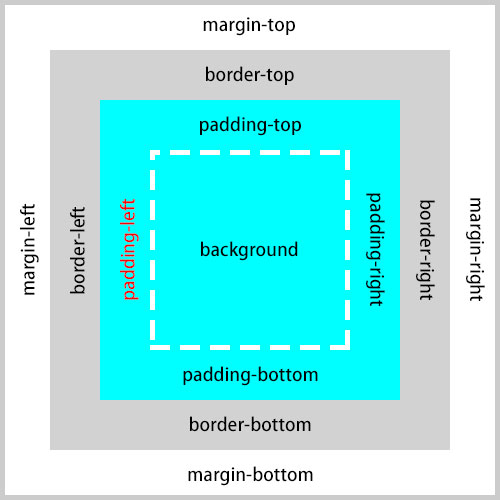
When a value is specified as '%', it is a relative value based on the width of the containing block. Note that vertical padding (top and bottom) is also based on the width — not the height — of the containing block.
<div style="width: 500px; margin: 0 auto; border: solid 1px #f00;">
	<div style="padding-left: 10%; background-color: #ff0;">This is a div element inside a div element. The parent div (red border) has 'width: 500px', and this element (yellow background) has 'padding-left: 10%'. So the left padding is '50px'.</div>
</div>
The padding specified with the 'padding-left' property is added to the element's own size, unless the 'box-sizing' property is set to 'border-box'.
<div style="padding-left: 20px; width: 300px; height: 300px; background-color: #ff0;">This is a div element. 'padding-left: 20px', 'width: 300px', and 'height: 300px' are specified. Since the padding is added to the element's size, this element's dimensions become width '320px' and height '300px'.</div>
Unlike the 'margin' property, padding can also be applied to inline-level elements where 'display' is 'inline', in which case padding is generated on all four sides of the line box.
<p>
	<span style="background-color: #ff0; padding-left: 10px;">This is a span element. 'padding-left: 10px' is specified.</span>
</p>
※ The 'padding' property is also explained in detail here.
Browser Compatibility
 Chrome1+ ○
 Firefox1+ ○
 Safari1+ ○
 Edge12+ ○
 IE11 ○10 ○9 ○
 8 ○7 ○
 6 ○
6 ○ Opera3.5+ ○
 2 and earlier ×
 iOS Safari1+ ○
 Android Browser4.4+ ○3 and earlier × Chrome AndroidLatest ○ Firefox AndroidLatest ○
※ Version data is based on MDN.
If you find any errors or copyright issues, please contact us.


 シェアする
シェアする