outline-width
Specifies the width of the outline. Unlike the 'border' property, outlines do not have separate top, right, bottom, and left sides.
Sample Code
div.test { outline-color: red;}
Available Values
| Value | Description |
|---|---|
| number | Specifies the outline width using a unit such as 'px'. |
| thin | Specifies width using the keyword 'thin'. Most browsers render this as 1px, though there may be slight differences between browsers. |
| medium | Specifies width using the keyword 'medium'. Most browsers render this as 3px, though there may be slight differences between browsers. This is the initial value when no 'outline-width' value is specified. |
| thick | Specifies width using the keyword 'thick'. Most browsers render this as 5px, though there may be slight differences between browsers. |
Browser Display Result
※ The samples below have 'outline: solid red' specified before the 'outline-width' property.
<div style="outline: solid red; outline-width: 5px; height: 100px; padding: 10px; font-weight: bold;">This is a div element with height 100px and padding 10px.</div>
Browser Compatibility
 Chrome1+ ○
 Firefox1.5+ ○
 Safari1.2+ ○
 Edge12+ ○
 IE11 ○10 ○9 ○
 8 ○7 ×
 6 ×
6 × Opera7+ ○
 6 and earlier ×
 iOS Safari1+ ○
 Android Browser4.4+ ○3 and earlier × Chrome AndroidLatest ○ Firefox AndroidLatest ○
※ Version data is based on MDN.
Details
Specifies the width of the outline. Unlike the 'border' property, outlines do not have separate top, right, bottom, and left sides.
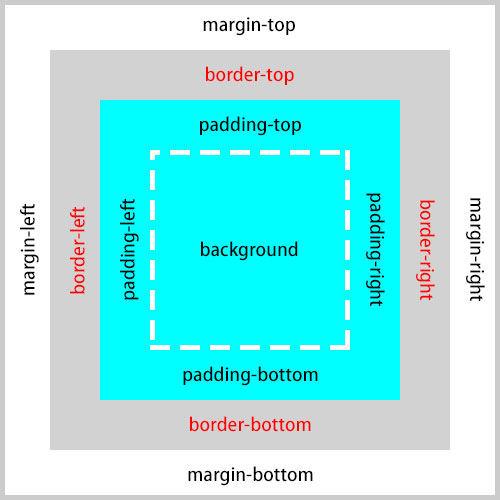
The outline is a border drawn outside the element's border area — not inside. It corresponds to the outside of the 'border-top', 'border-right', 'border-bottom', and 'border-left' areas shown in the box model diagram below.
<div style="border: solid 5px #000; outline: solid 5px; outline-color: red; height: 100px;">This is a div element with height 100px. You can see a red outline drawn around the black border.</div>
Unlike borders, outlines have no concept of size and take up no space. This means you can draw a border around content without affecting the layout of surrounding elements.
<style scoped>
	div:hover {border: solid 5px red;}
</style>
<p>The following sample shows how a border affects surrounding elements.</p>
<div style="height: 100px; background-color: yellow;">This is a div element with height 100px. Try hovering over this element. The border causes the element to change size, which affects the surrounding elements.</div>
<p style="height: 100px; background-color: aqua";>This is a p element.</p>
<style scoped>
	div:hover {outline: solid 5px red;}
</style>
<p>The following sample shows how an outline does not affect surrounding elements.</p>
<div style="height: 100px; background-color: yellow;">This is a div element with height 100px. Try hovering over this element. An outline is drawn but it does not affect the surrounding elements.</div>
<p style="height: 100px; background-color: aqua";>This is a p element.</p>
If you find any errors or copyright issues, please contact us.


 シェアする
シェアする