outline
Specifies all outline-related properties at once. The three properties that can be specified are 'outline-style', 'outline-color', and 'outline-width'. The order of values does not matter. Unlike the 'border' property, outlines do not have separate top, right, bottom, and left sides.
Sample Code
div.test { outline: solid 5px red;}
Available Values (outline-style)
| Value | Description |
|---|---|
| none | No outline is drawn. This is the initial value. |
| solid | The outline is drawn as a single solid line. |
| dashed | The outline is drawn as a dashed line with larger gaps. |
| dotted | The outline is drawn as a dotted line with smaller gaps. |
| double | The outline is drawn as two lines. |
| groove | The outline appears carved into the page. This is the reverse of 'ridge'. |
| ridge | The outline appears raised from the page. This is the reverse of 'groove'. |
| inset | The outline appears embedded into the page. This is the reverse of 'outset'. |
| outset | The outline appears to pop out from the page. This is the reverse of 'inset'. |
Available Values (outline-color)
| Value | Description |
|---|---|
| transparent | Sets the outline color to transparent. |
| color code or color name | Changes the outline to the specified color. If 'outline-color' is not specified, the color set by the 'color' property becomes the initial value. |
Available Values (outline-width)
| Value | Description |
|---|---|
| number | Specifies the outline width using a unit such as 'px'. |
| thin | Specifies width using the keyword 'thin'. Most browsers render this as 1px, though there may be slight differences between browsers. |
| medium | Specifies width using the keyword 'medium'. Most browsers render this as 3px, though there may be slight differences between browsers. This is the initial value when no 'outline-width' value is specified. |
| thick | Specifies width using the keyword 'thick'. Most browsers render this as 5px, though there may be slight differences between browsers. |
Browser Display Result
<div style="outline: solid 5px red; width: 90%; height: 100px; margin: 0 auto;">This is a div element with width 90% and height 100px.</div>
Browser Compatibility
 Chrome94+ ○
 Firefox88+ ○87 △86 △85 △84 △83 △82 △81 △80 △
 Safari16.4+ ○
 Edge94+ ○
 IE11 ○10 ○9 ○
 8 ○7 ×
 6 ×
6 × Opera80+ ○
 6 and earlier ×
 iOS Safari16.4+ ○
 Android Browser94+ ○ Chrome AndroidLatest ○ Firefox AndroidLatest ○
※ Version data is based on MDN.
Details
Specifies all outline-related properties at once. Unlike the 'border' property, outlines do not have separate top, right, bottom, and left sides.
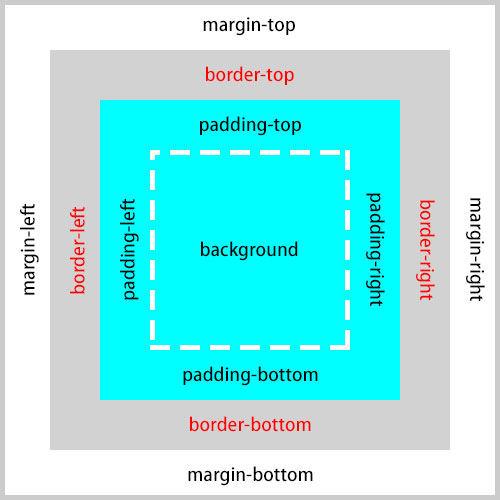
The outline is a border drawn outside the element's border area — not inside. It corresponds to the outside of the 'border-top', 'border-right', 'border-bottom', and 'border-left' areas shown in the box model diagram below.
<div style="border: solid 5px #000; outline: solid 5px; outline-color: red; height: 100px;">This is a div element with height 100px. You can see a red outline drawn around the black border.</div>
Unlike borders, outlines have no concept of size (width) and take up no space. This means you can draw a border around content without affecting the layout of surrounding elements.
<style scoped>
	div:hover {border: solid 5px red;}
</style>
<p>The following sample shows how a border affects surrounding elements.</p>
<div style="height: 100px; background-color: yellow;">This is a div element with height 100px. Try hovering over this element. The border causes the element to change size, which affects the surrounding elements.</div>
<p style="height: 100px; background-color: aqua";>This is a p element.</p>
<style scoped>
	div:hover {outline: solid 5px red;}
</style>
<p>The following sample shows how an outline does not affect surrounding elements.</p>
<div style="height: 100px; background-color: yellow;">This is a div element with height 100px. Try hovering over this element. An outline is drawn but it does not affect the surrounding elements.</div>
<p style="height: 100px; background-color: aqua";>This is a p element.</p>
If you find any errors or copyright issues, please contact us.


 シェアする
シェアする