margin-left
Specifies the left margin (outer spacing).
Sample Code
p.test { margin-left: 50px;}
p.test1 { margin-left: auto;}
p.test2 { margin-left: -50px;}
Available Values
| Value | Description |
|---|---|
| number | A numeric value. Commonly used units are 'px' and '%'. Negative values are also allowed. When specified as '%', the reference size is the width of the containing block. The initial value is '0'. |
| auto | Applies a value calculated from the opposite margin, or an equal value when both sides are 'auto'. When one side is 'auto', the remaining space after the other margin is applied. When both sides are 'auto', equal values are calculated and the element is centered horizontally. |
Browser Display Result
<div style="border: solid 1px #f00;">
	<div style="margin-left: 50px; width: 200px; border: solid 1px #00f; background-color: #ff0;">This is a div element. 'margin-left: 50px' and 'width: 200px' are specified.</div>
</div>
<div style="border: solid 1px #f00; width: 300px; margin: 0 auto;">
	<div style="margin-left: -50px; width: 200px; border: solid 1px #00f; background-color: #ff0;">This is a div element. 'margin-left: -50px' and 'width: 200px' are specified.</div>
</div>
<div style="border: solid 1px #f00;">
	<div style="margin-left: auto; margin-right: auto; width: 200px; border: solid 1px #00f; background-color: #ff0;">This is a div element. 'margin-left: auto', 'margin-right: auto', and 'width: 200px' are specified.</div>
</div>
Browser Compatibility
 Chrome1+ ○
 Firefox1+ ○
 Safari1+ ○
 Edge12+ ○
 IE11 ○10 ○9 ○
 8 ○7 ○
 6 ○
6 ○ Opera3.5+ ○
 2 and earlier ×
 iOS Safari1+ ○
 Android Browser4.4+ ○3 and earlier × Chrome AndroidLatest ○ Firefox AndroidLatest ○
※ Version data is based on MDN.
Details
Specifies the left margin (outer spacing).
A margin is the spacing outside the border. See the box model diagram below.
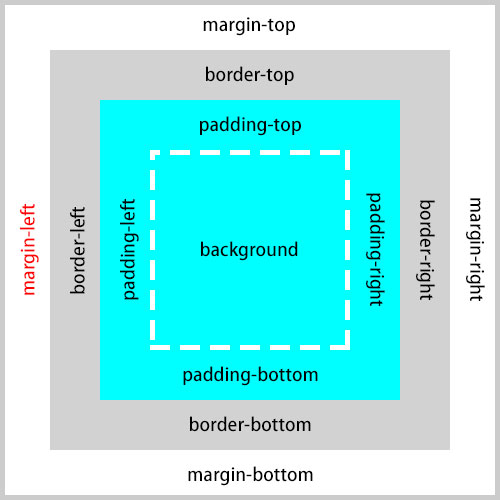
When a numeric value is specified as '%', it is a relative value based on the width of the containing block.
<div style="border: solid 1px #f00; width: 300px; margin: 0 auto;">
	<div style="margin-left: 10%; border: solid 1px #00f; background-color: #ff0;">This is a div element. 'margin-left: 10%' is specified. The containing block's width is '300px', so the left margin of this element is '30px'.</p>
</div>
Negative values can be specified for margin.
<div style="border: solid 1px #f00; width: 300px; margin: 0 auto;">
	<div style="margin-left: -50px; width: 200px; border: solid 1px #00f; background-color: #ff0;">This is a div element. 'margin-left: -50px' and 'width: 200px' are specified.</div>
</div>
Horizontal margins do not collapse. Margin collapse only occurs in the vertical direction.
When both left and right margins are set to 'auto', equal margin values are calculated automatically and the element is centered horizontally. Note that when centering a block-level element, a width must be specified with the 'width' property. Without a specified width, a block-level element defaults to 100% width, leaving no room for margins.
<div style="border: solid 1px #f00;">
	<div style="margin-left: auto; margin-right: auto; width: 200px; border: solid 1px #00f; background-color: #ff0;">This is a div element. 'margin-left: auto', 'margin-right: auto', and 'width: 200px' are specified.</div>
</div>
When only one horizontal margin is set to 'auto', the remaining space after the other margin's value is calculated and applied.
<div style="border: solid 1px #f00; width: 500px;">
	<div style="margin-left: auto; margin-right: 50px; width: 200px; background-color: #ff0;">This is a div element. 'margin-left: auto', 'margin-right: 50px', and 'width: 200px' are specified. The containing block (parent element) is '500px'. With 'margin-right: 50px' and 'width: 200px', the left margin is calculated to be '250px'.</div>
</div>
Inline-level elements (with 'display' set to 'inline') only support left and right margins; vertical margins have no effect. Also, setting horizontal margins to 'auto' on inline elements does not center them.
<p style="border: solid 1px #f00;">
	<span style="background-color: #ff0; margin-left: 50px;">This is a span element. 'margin-left: 50px' is specified. Vertical margins have no effect on inline-level elements.</span>
</p>
<p style="border: solid 1px #f00;">
	<span style="background-color: #ff0; margin-left: auto; margin-right: auto;">This is a span element. 'margin-left: auto' and 'margin-right: auto' are specified, but inline-level elements are not centered horizontally.</span>
</p>
※ The 'margin' property is also explained in detail here.
If you find any errors or copyright issues, please contact us.


 シェアする
シェアする