clip
Specifies whether to clip (crop) and display a box.
The 'clip' property can only be applied to elements whose 'position' property is set to 'absolute' or 'fixed'.
Sample Code
div.test { clip: auto;}
div.test1 { clip: rect(10px, 20px, 30px, 40px);}
Available Values
| Value | Description |
|---|---|
| auto | No clipping is applied. This 'auto' is the initial value. |
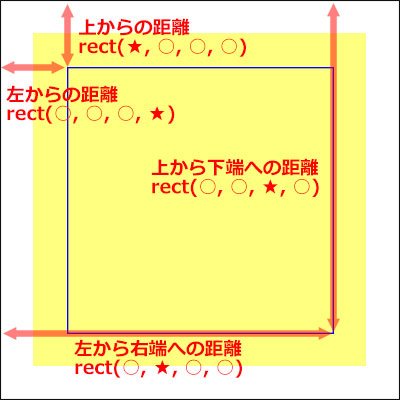
| rect() | Specifies the clipping region relative to the top-left corner of the box. The syntax is 'rect(distance from top, distance from left to right edge, distance from top to bottom edge, distance from left)'. |
Browser Preview
<div style="clip: auto; position: absolute; background-color: yellow; width: 200px; height: 200px;">A 200px × 200px div element with 'position: absolute'.</div>
<div style="clip: rect(5px, 195px, 195px, 5px); position: absolute; background-color: yellow; width: 200px; height: 200px;">A 200px × 200px div element with 'position: absolute'.</div>
<div style="clip: rect(5px, 195px, 195px, 5px); position: fixed; background-color: yellow; width: 200px; height: 200px;">A 200px × 200px div element with 'position: fixed'.</div>
Browser Support
Desktop
 Chrome1+ ○
 Firefox1+ ○
 Safari1+ ○
 Edge12+ ○
Supported in all versions
 IE11 ○10 ○9 ○
 8 ○7 ○
 6 ○
6 ○ Opera7+ ○
 6 and earlier ×
Mobile
 iOS Safari1+ ○
 Android Browser4.4+ ○3 and earlier × Chrome AndroidLatest ○
Same support as desktop
Firefox AndroidLatest ○Same support as desktop
※ Version data based on MDN.
Overview
Specifies whether to clip (crop) and display a box.
The 'clip' property can only be applied to elements whose 'position' property is set to 'absolute' or 'fixed'.
The syntax for 'rect()' is 'rect(distance from top, distance from left to right edge, distance from top to bottom edge, distance from left)'. Values can be separated by ',' or a space, but the standard is ',' so it is recommended to use ','. Note that IE7 and earlier only support space as a separator.
div.test { clip: rect(10px, 20px, 30px, 40px);} /* This is the standard syntax. */
div.test1 { clip: rect(10px 20px 30px 40px);} /* Use this for IE7 and earlier. */
If you find any errors or copyright issues, please contact us.


 シェアする
シェアする