border-radius
Sets the corner radius for all corners at once. The properties it can set together are『border-top-left-radius』,『border-top-right-radius』,『border-bottom-left-radius』, and『border-bottom-right-radius』.
You can specify different values for each corner by providing multiple values separated by spaces.
- 1 value: applied to all four corners (top-left, top-right, bottom-right, bottom-left).
- 2 values: first applies to top-left and bottom-right, second to top-right and bottom-left.
- 3 values: first applies to top-left, second to top-right and bottom-left, third to bottom-right.
- 4 values: applied to top-left, top-right, bottom-right, and bottom-left (clockwise from top-left).
Use『/』to specify separate horizontal and vertical radii for the corners. If『/』is omitted, a uniform radius (perfect circle) is used.
Sample Code
div.test { border-radius: 50%;}
div.test1 { border-radius: 25px;}
div.test2 { border-radius: 50% 25% 15%;}
div.test3 { border-radius: 25px 20px 15px 10px;}
div.test4 { border-radius: 50% / 25%;}
Available Values
| Value | Description |
|---|---|
| Number | Specifies a numeric value. Common units are『px』and『%』. When using『%』, the reference is the element's size (border box). The default value is『0』. |
Browser Preview
The background color of the samples below is『#00f』.
<div style="border-radius: 50%; background-color: #00f; margin: 0 auto; width: 100px; height: 100px;"></div>
<div style="border-radius: 25px; background-color: #00f; margin: 0 auto; width: 100px; height: 100px;"></div>
<div style="border-radius: 50% 25% 15%; background-color: #00f; margin: 0 auto; width: 100px; height: 100px;"></div>
<div style="border-radius: 25px 20px 15px 10px; background-color: #00f; margin: 0 auto; width: 100px; height: 100px;"></div>
<div style="border-radius: 50% / 25%; background-color: #00f; margin: 0 auto; width: 100px; height: 100px;"></div>
Browser Compatibility
 Chrome4+ ○
 3 △2 △1 △
 Firefox4+ ○
 3 △2 △1 △
 Safari5+ ○
 4 △3 △2 and below ×
 Edge12+ ○
 IE11 ○10 ○9 ○
 8 ×7 ×
 6 ×
6 × Opera10.5+ ○
 9 and below ×
 iOS Safari4.2+ ○3 △2 △1 △
 Android Browser≤4.4+ ○ Chrome AndroidLatest ○ Firefox AndroidLatest ○
Notes
Sets the corner radius for all corners at once.
When using『%』, the reference value is the element's size (border box). To make an element circular, set『border-radius』to『50%』.
<div style="border-radius: 50%; background-color: #00f; margin: 0 auto; width: 100px; height: 100px;"></div>
Use『/』to set horizontal and vertical radii individually. The value before『/』is the horizontal radius, and the value after is the vertical radius. This allows corners to be rounded as an ellipse rather than a perfect circle. If『/』is omitted, a uniform radius (perfect circle) is used.
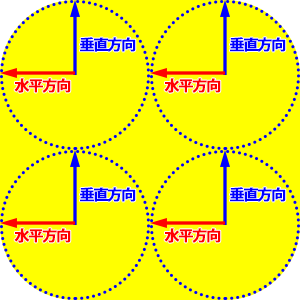
/* div { border-radius: horizontal / vertical;} */
div.test { border-radius: 50px 45px 40px 35px / 25px 20px 15px 10px;}
Note that some older Android stock browsers have a bug where specifying a『%』value for『border-radius』may not render correctly.
If you find any errors or copyright issues, please contact us.


 シェアする
シェアする