date / cal
date is a command for retrieving and formatting the current date and time. cal displays a calendar. Both are essential for generating log file names and naming backups in shell scripts.
Syntax
Display the current date and time.
date
Display with a format string.
date +format_string
Assign a formatted date to a variable.
today=$(date +%Y-%m-%d)
Display a specific date and time (GNU date only).
date -d "datetime_string"
Calculate a date N days in the past or future (GNU date only).
date -d "7 days ago" +%Y-%m-%d
Display this month's calendar.
cal
     March 2026
Su Mo Tu We Th Fr Sa
 1  2  3  4  5  6  7
 8  9 10 11 12 13 14
15 16 17 18 19 20 21
22 23 24 25 26 27 28
29 30 31
Specifying a year displays a full year calendar.
cal 2026
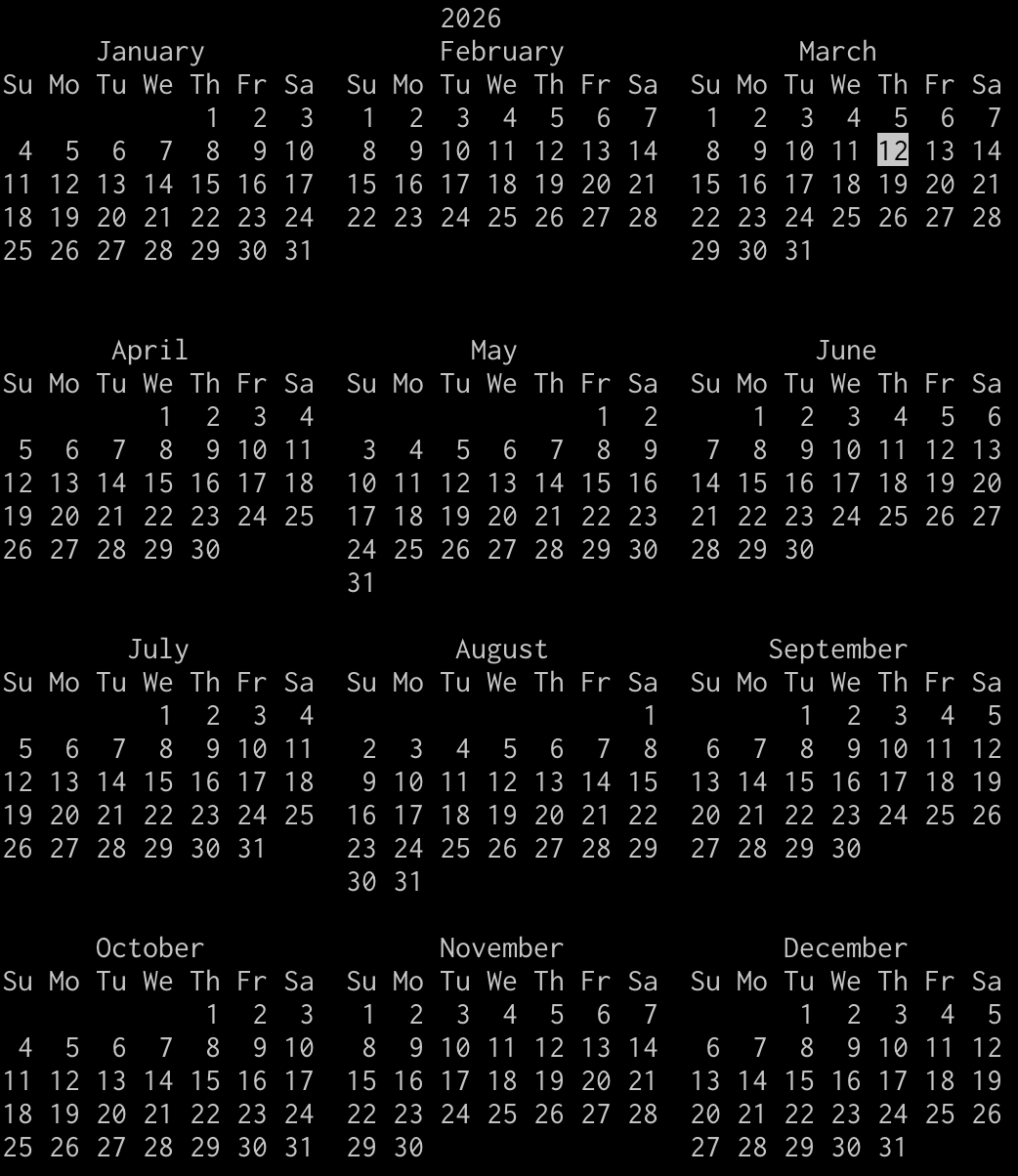
Specifying a month and year displays that month's calendar.
cal 3 2026
     March 2026
Su Mo Tu We Th Fr Sa
 1  2  3  4  5  6  7
 8  9 10 11 12 13 14
15 16 17 18 19 20 21
22 23 24 25 26 27 28
29 30 31
Format String Reference
| Format | Description / Output Example |
|---|---|
| %Y | Four-digit year (e.g., 2026). |
| %m | Month (01–12). |
| %d | Day of the month (01–31). |
| %H | Hour in 24-hour format (00–23). |
| %M | Minute (00–59). |
| %S | Second (00–59). |
| %A | Full weekday name in English (e.g., Friday). |
| %a | Abbreviated weekday name in English (e.g., Fri). |
| %B | Full month name in English (e.g., March). |
| %s | Unix timestamp (seconds since the epoch). |
| %Z | Timezone name (e.g., JST). |
| %Y%m%d | YYYYMMDD format (e.g., 20260306). |
| %Y-%m-%d %H:%M:%S | ISO 8601-style format (e.g., 2026-03-06 12:00:00). |
Sample Code
Display the current date and time.
date
Fri Mar  6 12:00:00 JST 2026
Display the date and datetime using format strings.
echo "Today: $(date +%Y-%m-%d)"
Today: 2026-03-06
echo "Now: $(date '+%Y-%m-%d %H:%M:%S')"
Now: 2026-03-06 12:00:00
Written as a shell script, it looks like this.
date_sample.sh
echo "Today: $(date +%Y-%m-%d)"
echo "Now: $(date '+%Y-%m-%d %H:%M:%S')"
bash date_sample.sh
Today: 2026-03-06
Now: 2026-03-06 12:00:00
Use a date in a backup file name.
backup.sh
today=$(date +%Y%m%d)
tar -czf "backup_${today}.tar.gz" /var/www/html/
echo "Backup complete: backup_${today}.tar.gz"
bash backup.sh
Backup complete: backup_20260306.tar.gz
Define a function that prepends a timestamp to log messages. The following is written as a shell script.
log_sample.sh
log() {
    echo "[$(date '+%Y-%m-%d %H:%M:%S')] $*"
}
log "Process started"
log "Data retrieval complete"
bash log_sample.sh
[2026-03-06 12:00:00] Process started
[2026-03-06 12:00:03] Data retrieval complete
You can also enter a function definition directly in the terminal. After pressing Enter following the {, a > prompt appears — this means input is still expected. Enter } to complete the definition.
log() {
    echo "[$(date '+%Y-%m-%d %H:%M:%S')] $*"
}
log "Process started"
[2026-03-06 12:00:00] Process started
log "Data retrieval complete"
[2026-03-06 12:00:03] Data retrieval complete
Measure elapsed time using Unix timestamps. The following is written as a shell script.
timer.sh
start=$(date +%s)
sleep 2
end=$(date +%s)
echo "Elapsed time: $((end - start)) seconds"
bash timer.sh
Elapsed time: 2 seconds
Calculate relative dates with GNU date (Linux). The following is written as a shell script.
date_calc.sh
# Date 7 days from now (Linux)
date -d "7 days" +%Y-%m-%d

# Date 7 days ago (Linux)
date -d "7 days ago" +%Y-%m-%d
bash date_calc.sh
2026-03-13
2026-02-27
On macOS (BSD date), use the -v option instead.
date_calc.sh
# Date 7 days from now (macOS)
date -v+7d +%Y-%m-%d

# Date 7 days ago (macOS)
date -v-7d +%Y-%m-%d
bash date_calc.sh
2026-03-13
2026-02-27
Display a calendar.
cal 3 2026
     March 2026
Su Mo Tu We Th Fr Sa
 1  2  3  4  5  6  7
 8  9 10 11 12 13 14
15 16 17 18 19 20 21
22 23 24 25 26 27 28
29 30 31
Notes
For naming backups in scripts, $(date +%Y%m%d) and $(date +%Y%m%d_%H%M%S) are the standard conventions. For log output, wrapping $(date '+%Y-%m-%d %H:%M:%S') in a function keeps your code clean and reusable.
Relative date calculation with date -d is a GNU date (Linux) feature. On macOS (BSD date), write it as date -v+7d instead. For portable scripts, you can also use python3 -c "from datetime import..." as an alternative.
If you find any errors or copyright issues, please contact us.


 シェアする
シェアする